Floral Wedding Graphics Purple Clipart: A Practical Guide to Choosing and Using Handpainted Watercolor Designs
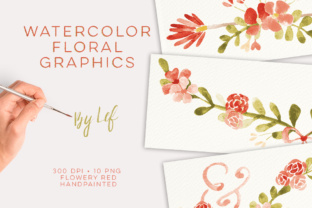
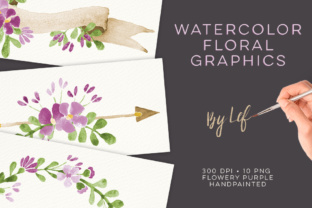
Floral Wedding Graphics Purple Clipart offers a charming, elegant solution for a wide variety of creative projects. These handpainted watercolor illustrations are ideal for wedding stationery, greeting cards, digital designs, and more. With a soft purple color palette and a natural, artistic feel, this set brings a touch of sophistication to any visual project. The package includes 10 high-resolution PNG files, all at 300 DPI, making them suitable for both print and digital use. Sizes range from 7 to 11 inches in width or height, with the exception of the ampersand design, which is approximately 3 inches tall.
Why People Choose Floral Wedding Graphics Purple Clipart
The appeal of this clipart set lies in its versatility and aesthetic. Handpainted watercolor graphics have a timeless charm that resonates with both modern and traditional design sensibilities. Whether you're a small business owner creating custom wedding invitations or a blogger designing a printable planner, these graphics add a professional and artistic touch without requiring advanced design skills.
Many users are drawn to the soft purple tones, which evoke romance and elegance—perfect for weddings and special events. Additionally, the PNG format ensures transparency, allowing for easy integration into different backgrounds and layouts.
Common Mistakes When Using Floral Wedding Graphics Purple Clipart
While these graphics are beautiful and user-friendly, there are several common mistakes that users—both beginners and experienced creators—often make when selecting or applying them.
1. Overlooking File Resolution and Size
One of the most frequent errors is not checking the actual resolution and size of the graphics before use. Although the set includes 300 DPI files, some users may attempt to scale them beyond their intended dimensions, especially when printing large-format materials like posters or signage. This can lead to pixelation or blurry images, which compromise the professional look of your project.
Better approach: Always verify the pixel dimensions and physical size at 300 DPI before placing graphics in your layout. If you need to enlarge a design, consider using vector-based alternatives or consult a designer for custom scaling.
2. Ignoring Color Compatibility
Another common issue is assuming that the soft purple tones will work with any color scheme. While purple is a versatile and elegant choice, it may clash with certain background colors or brand palettes. This oversight can result in a mismatched or unprofessional appearance.
Better approach: Test the clipart in your design mockup before finalizing. Use design software like Canva, Photoshop, or Illustrator to adjust hues slightly if needed, or choose complementary background colors that harmonize with the purple tones.
3. Using Too Many Graphics in One Design
It’s tempting to use multiple elements from the set in a single design, especially since they’re all visually appealing. However, overusing graphics can clutter your layout, distract from your message, and make your design feel chaotic.
Better approach: Stick to a cohesive visual hierarchy. Choose 2–3 key graphics that enhance the design without overpowering it. For example, use a large floral border for framing and a smaller ampersand as a subtle accent in wedding stationery.
Practical Tips for Getting the Most from Your Clipart
Using Floral Wedding Graphics Purple Clipart effectively requires more than just placing images on a page. Here are some practical suggestions to help you maximize their impact:
- Use layers creatively: In design software, layer graphics behind text or other elements to create depth and dimension.
- Consider spacing: Allow ample white space around each graphic to let it breathe and maintain visual balance.
- Test in different formats: Try the graphics in both portrait and landscape layouts to see which works best for your project.
- Print a sample: Before printing a large batch of invitations or cards, print a test copy to ensure colors and details look as expected.
What to Check Before Downloading or Purchasing
Before you commit to using Floral Wedding Graphics Purple Clipart, there are a few key details to verify to ensure it meets your needs:
- License terms: Confirm whether the clipart can be used for commercial purposes, especially if you're a small business owner or freelancer selling designs.
- File format: Make sure the files are in PNG format with transparent backgrounds, which allows for greater flexibility in design.
- Compatibility: Ensure the graphics work with your preferred design tools (Canva, Photoshop, Illustrator, etc.).
- Size variety: Check that the set includes a range of sizes and styles to suit different design applications, from large borders to small accents like the ampersand.
Final Thoughts
Floral Wedding Graphics Purple Clipart is a valuable resource for anyone looking to add a touch of elegance and artistry to their projects. Whether you're designing wedding invitations, creating social media graphics, or crafting personalized greeting cards, these handpainted watercolor illustrations offer both beauty and functionality.
By being mindful of file resolution, color compatibility, and design balance, you can avoid common pitfalls and ensure your final product looks polished and professional. Always test your designs before printing or publishing, and double-check licensing and file specifications to make the most of your purchase.
With a little planning and attention to detail, Floral Wedding Graphics Purple Clipart can elevate your creative work and help you deliver stunning results every time.