Foliage Watercolor Wedding Invite II: A Practical Design for Romantic Rustic Weddings
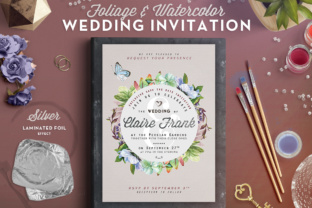
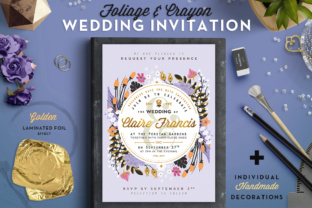
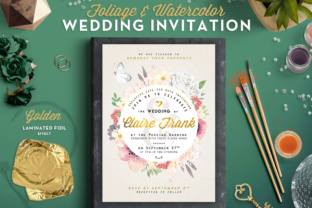
The Foliage Watercolor Wedding Invite II is a thoughtfully crafted design that brings together the elegance of watercolor textures with the softness of botanical elements. Designed with romantic rustic weddings in mind, this invitation template offers a versatile and visually appealing solution for couples and designers who want to communicate a warm, nature-inspired theme through their stationery. At 5x7 inches and built as a fully editable PSD file, it fits seamlessly into modern design workflows while maintaining print-ready quality at 300 DPI with 0.25” bleed margins.
Integrating Foliage Watercolor Wedding Invite II into Your Wedding Planning Workflow
Wedding planning involves multiple stages, from initial concept development to final execution. The Foliage Watercolor Wedding Invite II serves as a critical touchpoint during the early communication phase. It’s not just an invitation—it’s a visual representation of the event’s tone and theme. When incorporated early in the planning process, this design helps align other creative decisions such as venue décor, floral arrangements, and even attire choices.
Designers and couples can use this template as a foundation for creating a cohesive visual identity. For instance, the color palette extracted from the watercolor foliage can be mirrored in save-the-date cards, thank-you notes, and even digital announcements. This consistency not only strengthens brand recognition for the event but also streamlines the overall design process by reducing the need for multiple style explorations.
Preparation and Compatibility: Setting Up for Design Success
One of the key strengths of the Foliage Watercolor Wedding Invite II is its compatibility with Adobe Photoshop. As a fully layered PSD file, it allows for easy customization without compromising quality. Designers can toggle visibility, adjust color overlays, and swap out fonts without affecting the structural integrity of the design.
Before diving into customization, it’s important to ensure your software is up to date and that you’re working in the correct color mode—CMYK for print and RGB for digital use. Organizing your workspace by grouping layers and labeling folders can significantly improve efficiency, especially when collaborating with printers or other designers. This level of preparation supports a smoother design process and reduces the risk of formatting issues during the final output stage.
Typography and Visual Flow: Enhancing Readability and Aesthetic Appeal
The typography selection in the Foliage Watercolor Wedding Invite II plays a crucial role in balancing elegance with legibility. Choosing the right font pairings—such as a script font for the couple’s names and a clean serif or sans-serif for event details—ensures that the design remains both romantic and functional. The whimsical floral elements act as visual anchors, guiding the reader’s eye through the content in a natural flow.
When working with the template, consider how each text layer interacts with the background. Watercolor textures can sometimes reduce contrast, so it’s helpful to test different text colors or add subtle drop shadows for better readability. This attention to detail enhances both the aesthetic and practical function of the invitation, ensuring guests receive all necessary information clearly and beautifully.
Customization Tips for a Personalized Touch
While the template provides a strong visual foundation, personalization is key to making the invitation truly unique. Here are a few practical tips to consider during the customization phase:
- Swap out floral elements to match the wedding’s seasonal blooms or regional flora.
- Adjust color overlays to align with the couple’s preferred palette—this can be done quickly using layer styles.
- Experiment with layout variations by duplicating the main file and testing different text placements or graphic elements.
- Ensure print readiness by double-checking bleed areas and exporting in the correct format (PDF or high-resolution JPEG) for your printer’s specifications.
These small but impactful changes allow for a high degree of customization without requiring advanced design skills, making the Foliage Watercolor Wedding Invite II accessible to both professionals and DIY couples.
Workflow Integration: From Design to Delivery
Once the design is finalized, the next step is integrating it into the broader wedding communication strategy. Whether you're printing physical invitations or converting the design into a digital format, the PSD file format provides flexibility for both paths. For digital use, exporting to PDF or PNG allows for quick sharing via email or social media, while the print-ready setup ensures that the design translates well onto physical paper stock.
Consider how this invitation fits into your overall guest communication timeline. Sending out invitations typically happens 6–8 weeks before the event, but the design can be repurposed earlier for save-the-date announcements or later for post-wedding thank-you cards. This reuse not only saves time but also reinforces the visual continuity of the event’s branding.
Quality Control and Long-Term Use
Maintaining quality across different uses and formats is essential. When exporting the file for print, always verify that the resolution remains at 300 DPI and that the bleed area is included. For digital versions, check how the design appears on different screen sizes to ensure readability and visual appeal across devices.
From a long-term perspective, keeping a well-organized version of the original PSD file can be valuable for future reprints or design updates. Storing it alongside any alternate versions or color variations ensures that you have a complete design archive that can be referenced for anniversaries, vow renewals, or even family events down the line.
Collaboration and Client Communication
For professional designers, the Foliage Watercolor Wedding Invite II is a valuable asset that streamlines client collaboration. Presenting a well-structured design with clear customization options helps clients visualize the final product and make informed decisions. The layered PSD format allows for easy revisions, enabling designers to quickly show different layout or color variations without starting from scratch.
When working with clients who may not be familiar with Photoshop, consider providing a simplified preview or annotated notes within the file to explain key elements. This transparency fosters trust and ensures that the client feels involved in the creative process, which is especially important for emotionally significant projects like wedding invitations.
Final Thoughts: A Design That Serves a Purpose
The Foliage Watercolor Wedding Invite II is more than just a beautiful template—it’s a functional design tool that integrates smoothly into real-world workflows. Whether you're a professional designer, a couple planning your own wedding, or a creative entrepreneur building a stationery brand, this template offers flexibility, quality, and visual appeal. By understanding how to prepare, customize, and integrate it into your broader planning and communication efforts, you can ensure that your invitations not only look great but also serve their intended purpose effectively.