Vector Floral Wreaths & Laurels: A Designer’s Creative Toolkit
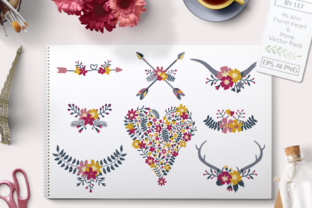
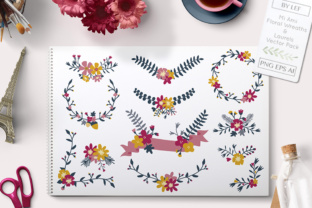
Vector Floral Wreaths and Laurels is more than just a design pack—it’s a versatile, ready-to-customize resource for creators working across print and digital media. Whether you're crafting wedding invitations, designing branding assets, or building seasonal graphics, this set delivers high-quality vector files and PNGs that adapt to your vision. With 12 PNG files, an AI file, and an EPS file included, it’s a well-rounded toolkit for both beginners and experienced designers.
Why Vector Floral Wreaths and Laurels Stand Out
One of the most compelling features of this design pack is its flexibility. The vector format allows for infinite scalability without loss of quality, making it ideal for everything from small social media graphics to large-format prints. The included laurels and floral wreaths are elegant yet versatile, lending themselves to a wide range of styles—from vintage-inspired motifs to modern minimalist designs.
Each file is crafted with clean lines and balanced composition, ensuring that even after customization, the final output remains polished and professional. The ability to recolor and resize without distortion means you can tailor these graphics to match your brand palette or project theme with minimal effort.
Creative Uses Across Design Projects
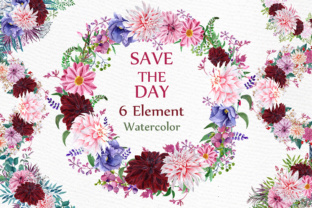
This set shines in wedding-related design work. The floral wreaths make stunning frames for invitation suites, seating charts, and thank-you cards. The laurel graphics can be repurposed as decorative dividers or background elements that add a touch of sophistication without overwhelming the layout.
- Wedding invitations and stationery
- Business branding elements (logos, social media banners)
- Seasonal greeting cards and holiday announcements
- Blog headers and Pinterest graphics
- Print-on-demand products like mugs, tote bags, and notebooks
Adapting for Different Styles and Audiences
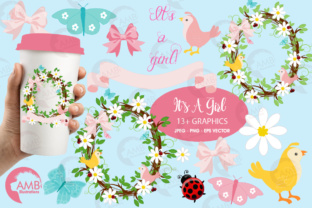
The beauty of Vector Floral Wreaths and Laurels lies in how easily they can be adapted to suit different design aesthetics. For example, a soft pastel color scheme transforms the graphics into a dreamy, feminine look—perfect for bridal or baby shower designs. On the other hand, swapping out florals for monochrome tones and geometric layouts can give the same graphics a bold, editorial feel suitable for editorial or corporate use.
Bloggers and small business owners can integrate these graphics into marketing materials, while educators might use them to enhance digital or printed lesson plans. The key is to align the style and color palette with your intended audience and message.
Practical Tips for Customization
When working with vector files, it’s important to maintain clarity and consistency. Here are a few tips to get the most out of your design pack:
- Start with a clear purpose: Know the end use before diving into customization—this helps guide your color choices and layout decisions.
- Use layers wisely: The AI file allows for layered editing, so consider separating elements to adjust shadows, textures, or outlines individually.
- Stick to a cohesive color scheme: While the files are easy to recolor, too many colors can make a design feel chaotic. Use a limited palette for a more professional finish.
- Resize with intention: Vector files scale well, but always preview how the design looks at its intended size—especially for print projects.
How to Keep Your Design Work Audience-Friendly
Design is only as effective as its ability to communicate. Whether you're creating for a client or personal brand, always consider the viewer. Vector Floral Wreaths and Laurels offer a strong visual foundation, but your choices in layout, typography, and color will determine how well the design resonates.
For wedding invitations, pairing these graphics with elegant serif fonts enhances the romantic tone. For branding or marketing materials, clean sans-serif fonts keep the design modern and readable. Always test your design across different formats and screen sizes to ensure clarity and visual impact.
Designing for Different Platforms
Because this pack includes both vector and PNG formats, it’s well-suited for a variety of platforms. Designers using Adobe Illustrator can edit the AI file for full customization, while those working in Canva, Photoshop, or Figma can easily import the PNGs for quick layout work.
For digital use, consider optimizing file sizes without compromising resolution—especially for web-based projects. When designing for print, always double-check bleed margins, color profiles (CMYK for print, RGB for digital), and file resolution to ensure professional results.
Inspiration for Real-World Projects
Need a creative jumpstart? Here are a few real-world applications that make the most of this versatile design set:
- Brand Identity: Use laurels as part of a logo or badge to evoke a sense of achievement or tradition.
- Social Media Content: Frame Instagram posts or Pinterest boards with floral wreaths to create a cohesive visual style.
- Event Branding: Incorporate laurel graphics into signage, programs, or thank-you cards for conferences or award ceremonies.
- Editorial Design: Add subtle floral borders to newsletters, magazine covers, or book chapter headers for visual interest.
Final Thoughts: A Versatile Resource for Designers
Vector Floral Wreaths and Laurels is a valuable asset for any creative professional looking to streamline their workflow while maintaining visual appeal. Whether you're designing for print, digital, or product-based projects, this pack offers a flexible foundation that can be tailored to your unique needs. By combining thoughtful customization with practical design principles, you can create results that are not only beautiful but also meaningful and audience-focused.